13th July 2026 – A new generation of the operating system built on Debian 13, unique factory passwords on the labels, and much more. Here is a summary of what is changing for the Neuron, Patron, Gate, and Edge units – and what it all means for your existing installations.
From early July 2026 onwards, Unipi Gate and Edge units ship from the factory with a new generation of the operating system built on Debian 13. In addition, all units across the product lines are getting new labels. The changes arrive with newly manufactured products and new system images – units already in the field are only affected once you flash a new system image onto them or send them in for service.
How the changes affect you
- Buying a new unit: A new label with a unique factory password, the new-generation system, Modbus TCP on port 50200.
- Running existing units and changing nothing: Everything keeps running as before.
- Flashing a new system image: The new port and the new password rules apply. Older units keep the unipi.technology password.
- Sending a unit in for service: It will return with the current standard system (Gate now with Base OS) and a new label. Back up your application and data before shipping.
New labels with a unique factory password
Every unit now ships with three types of labels: a production label, an two identical information labels, and packaging label. Labels are more durable (both the material and the ink), adhere better, use UL-compliant material, and are machine-readable. The serial number on the information label now includes the date of manufacturing (digits 2–5) in the YYWW format, so the year and week of manufacturing are easy to identify.
- Example serial number: 1264200001 – manufactured in 2026, week 42.
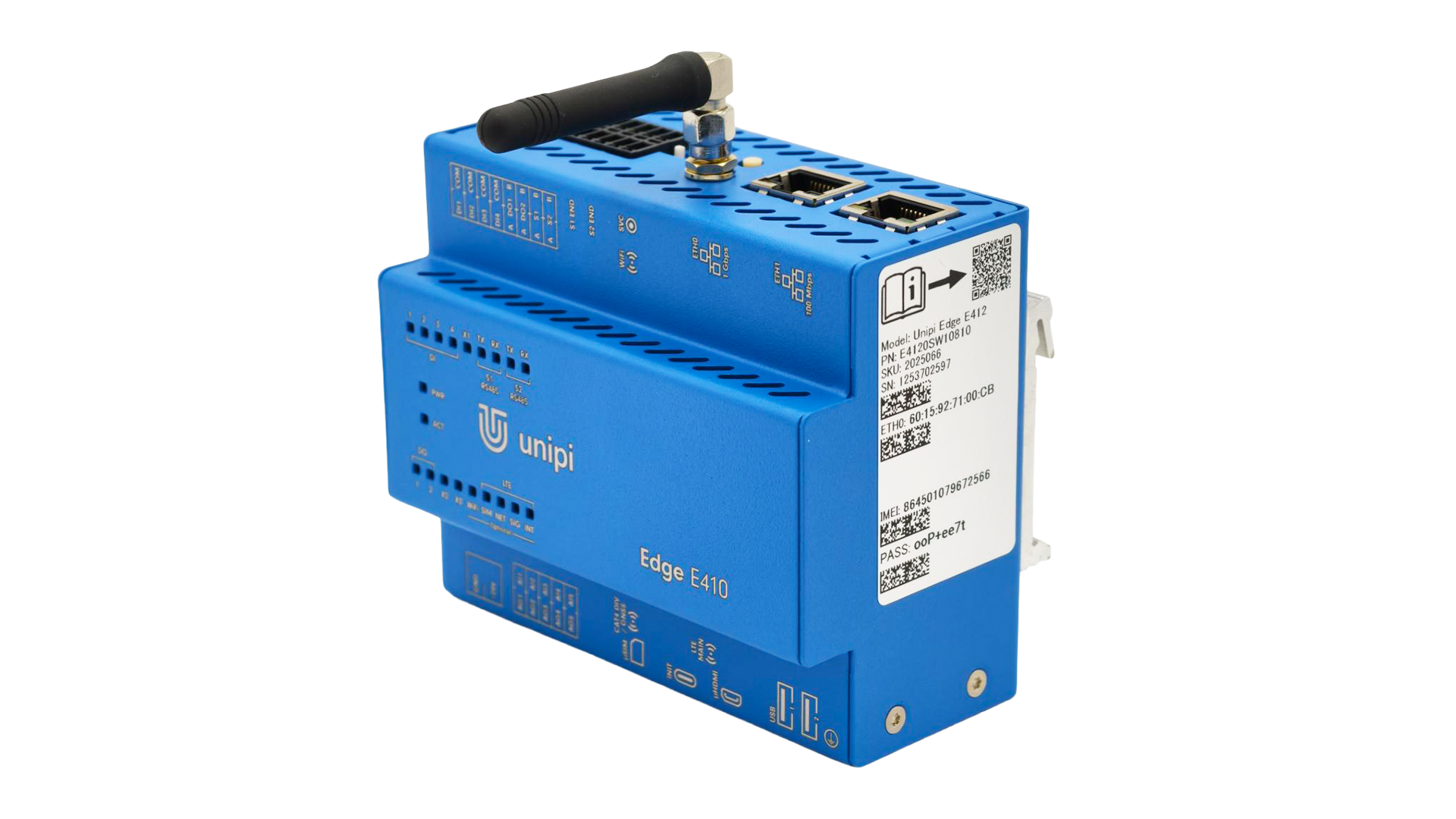 The new information label includes a unique factory password.
A new OS built on Debian 13
The new Base OS is built on Debian 13 and delivers greater overall stability. On the Patron and Gate lines, the kernel is also moving to the CIP 6.12 branch (Civil Infrastructure Platform – a Linux kernel maintained long-term for industrial devices). A unified kernel branch improves code quality and maintainability.
How the unique factory password on the new information label works (Edge, Patron, Gate):
- First login after flashing the system image: The system immediately requires you to set your own password.
- Logging in to service mode: The factory password from the label remains permanently valid. Take a photo of the label during installation and store it with the project records – you will still need the password years down the line, for example to access service mode.
You can read more about password management in our knowledge base. When moving to Base OS with Debian 13, users of Neuron and Unipi 1.1 units create their password with our password generator, as described in our guide.
Enhanced security:
- HTTPS: Service mode is now served over HTTPS and protected by the factory password from the label; unique passwords remove the most common weak point – a universal factory password.
Improved reliability:
- Watchdog: If the system hangs during startup, the unit restarts itself – no technician visit required.
- More stable serial line: The serial-line LEDs on Patron and Gate units are now controlled outside the main driver, following the established practice of the Edge units.
- Memory overcommit disabled: Applications can now only allocate the physical memory that is actually available. Previously, an application could allocate more memory than the unit physically had, which resulted in random process terminations once the memory filled up. Memory overcommit can be switched on or off as needed.
You will find the Base OS changelog for Debian 13 in our knowledge base.
Native systems by product line
Units always return from service with their native operating system. Back up your data before shipping.
- Neuron: Still ships without a preinstalled system.
- Patron: Still ships with Mervis OS preinstalled.
- Edge: Still ships with Base OS preinstalled.
- Gate: Now ships with Base OS preinstalled.
Unipi TCP port change from 502 to 50200
After the system update to Debian 13, the default port of the Unipi TCP service (the unit's Modbus TCP server) automatically changes from 502 to 50200.
- When: The change arrives with the new system image.
- What to do: After flashing the new system image, change your application's target port to 50200, or reconfigure Unipi TCP back to the original port 502 (see the guide here).
- Benefit: The standard port 502 is now free for your own Modbus server.
Older units
For units with older serial numbers, the original password unipi.technology still applies. Original password will not be printed on new label after servicing.
End of support for the armhf architecture
Units fitted with a Raspberry Pi 2 or older will no longer receive system updates.
Easier change tracking (PCN)
We are introducing a PCN (Product Change Notification) system that will let us inform you about changes more frequently. You will find the latest information in our knowledge base.
Where to find out more
If you are not sure what the changes mean for your units, simply send their serial numbers to our technical support.